How to Convert TXT to PDF Online: (Beginner’s Guide)
TXT files are simple and lightweight. They are great for writing notes, saving quick ideas, or storing raw text. However, the moment you need to share, submit, or print a TXT file, problems begin to appear.
The text may look fine on your screen, but on another device, it appears messy. Long content becomes a single, long block. Headings don’t stand out. Pages don’t break properly. And many platforms don’t accept TXT files at all.
That’s exactly why converting TXT to PDF is no longer optional. It becomes a must.
In this complete beginner-friendly guide, you’ll learn how to convert TXT files into a PDF online for free using pdfimagetool.com’s TXT to PDF converter. The steps are simple, no software is required, and the result works perfectly on all devices.
What Is a TXT File and Why Do People Use It?
A TXT file, also called a plain text file, contains only raw text. It does not support fonts, colors, layouts, margins, or styling. This is what makes TXT files fast, lightweight, and compatible with almost every system.
People commonly use TXT files for:
- Writing notes or drafts
- Saving logs and system data
- Writing code snippets
- Storing copied text
- Keeping quick information without formatting
TXT files are easy to create and open, but that simplicity becomes a limitation when the file needs to look professional.
Why TXT Files Cause Problems When Sharing or Printing
TXT files don’t understand document structure. They don’t know how pages should look.
A TXT file does not support:
- Page size
- Margins
- Line spacing rules
- Headings and sections
- Page breaks
Because of this, users face issues like:
- Long files are becoming hard to read
- Poor printing results
- Different layouts on different devices
- Rejection on official platforms
That’s why many users search for a reliable TXT to PDF solution.
What Happens When You Convert TXT to PDF?
When you convert a TXT file to PDF, the content stays the same, but the presentation improves completely.
The text is placed inside a structured document with:
- Proper pages
- Clean margins
- Readable spacing
- A consistent layout
A PDF looks the same on every device. Whether it’s opened on a phone, laptop, or tablet, the formatting stays intact. This makes PDF the best format for sharing, printing, and submitting text-based files.
How to Convert TXT to PDF Using PDFimagetool’s Converter
Using an online TXT to PDF converter is the easiest method, especially for beginners.
This method is ideal for students, freelancers, office users, and anyone who wants fast and clean results.
STEP 1: Open the TXT to PDF Converter Tool
First, visit PDFimagetool and locate the TXT to PDF converter. You can find it easily through the menu or by searching for the tool directly.
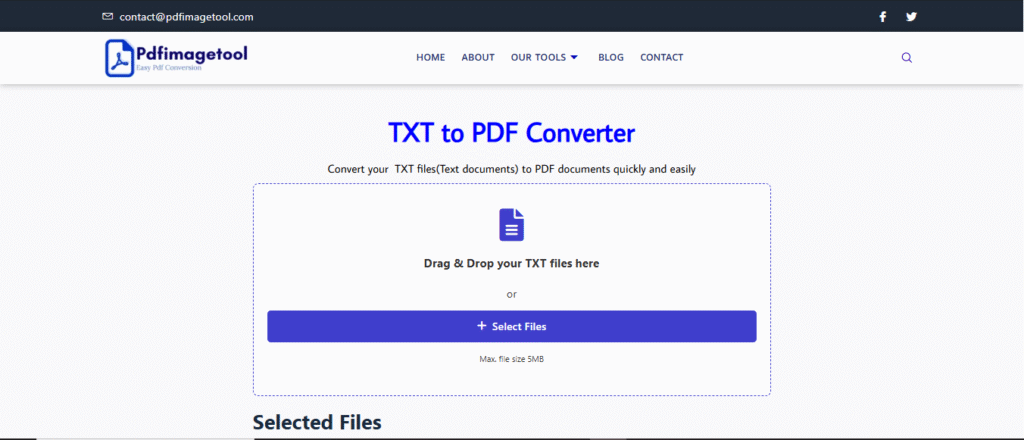
The converter works smoothly on all devices, including desktops, tablets, and mobile phones. Without any complication.
STEP 2: Upload Your TXT File
Once the tool page opens, you’ll see an upload option.
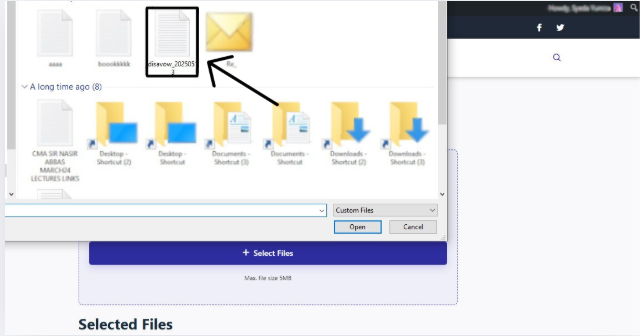
Click on it and select the TXT file from your device. You can also drag and drop the file directly into the upload area.
The tool accepts TXT files of different sizes and handles long text files without any issue.
STEP 3: Convert TXT to PDF
After uploading the file, click on the Conversion button, and the conversion process starts automatically.
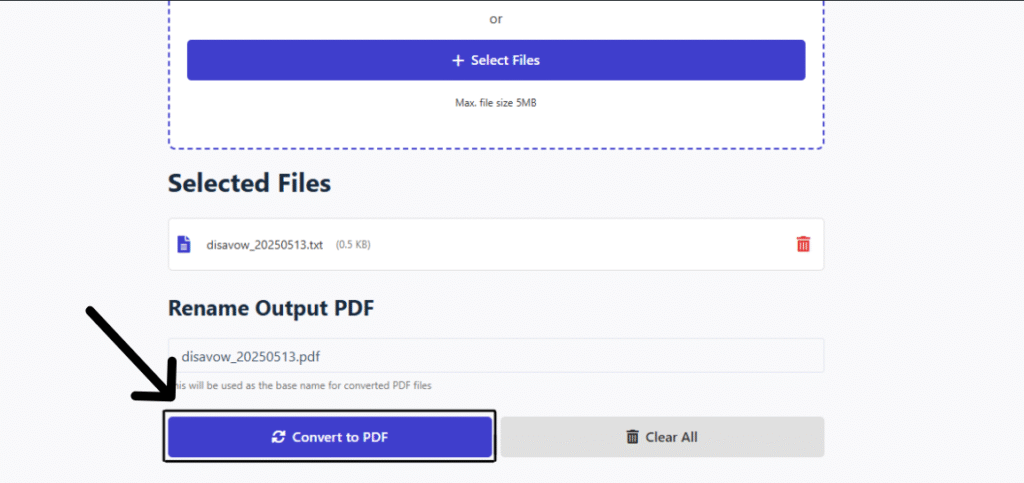
You don’t need to choose page size, margins, or formatting options. The converter handles everything for you and turns your plain text into a properly structured PDF.
The text is organized into clean pages with readable spacing. Even large TXT files are converted smoothly without breaking lines or mixing content.
This step usually takes only a few seconds.
STEP 4: Preview and Download Your PDF File
Once the conversion is complete, your PDF file appears instantly on the screen.
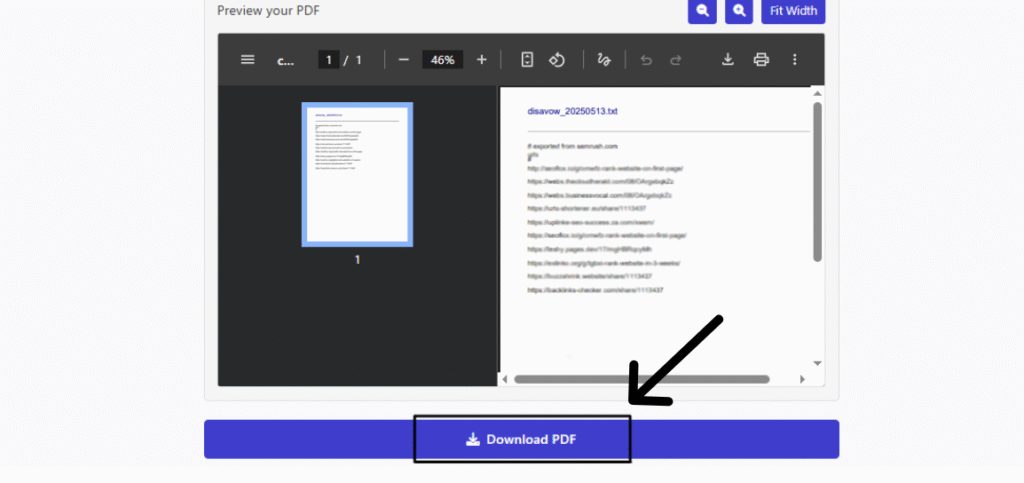
You’ll see a PDF preview, which allows you to:
- Scroll through the pages
- Zoom in or out
- Check text alignment
- Review the final layout
If everything looks good, click the Download PDF button to save the file to your device.
You can now share, print, upload, or store the PDF without worrying about formatting issues.
Frequently Asked Questions (FAQs)
How to turn a TXT into a PDF?
Upload the TXT file to an online TXT to PDF converter, convert it, preview the PDF, and download it. The process is quick and requires no software.
Is converting TXT to PDF safe?
Yes, it is safe when using a trusted converter. Your file content stays private and unchanged. For sensitive text files, always use a secure and reliable platform.
How to convert text to PDF on a phone?
Open the converter in your mobile browser, upload the TXT file from your phone, convert it, preview the PDF, and download it.
The process is simple and works on both Android and iPhone devices.
Is it free to convert TXT to PDF?
Yes, TXT to PDF conversion is completely free. No sign-up or payment is required.
Is there a way to print out text messages?
First, convert your text messages into a TXT file. Then, after converting TXT to PDF, you can:
- Open the PDF
- Use the print option
- Adjust page size
- Get clean and readable print results
This makes PDF the best choice for printing text content.
Final Words
TXT files are useful, but they lack proper formatting for professional sharing and printing. Converting TXT to PDF fixes all these problems by giving your text a clean and structured layout.
With an online TXT to PDF converter, you can convert files quickly, preview them instantly, and use them anywhere without formatting issues.
This simple conversion saves time, avoids errors, and makes your text files ready for real-world use.
Great content! Keep up the good work!